You are here: Tools > Softscope > Plugging Probes > Plug in Pipe Network

Plugging a probe from the Pipe Network

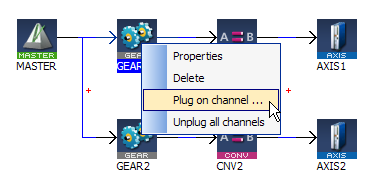
In order to plug a probe from the Pipe Network:

  1. Right-click on a Pipe Block
  2. Select Plug on channel… in the menu

    Plugging a Probe from the Pipe Network
  3. Figure 10-31: Plugging a Probe from the Pipe Network

  4. Define the probe parameters (this step shows the same dialog box used in the Plugging a probe from the Dictionary section)


Stay Connected with Kollmorgen

Copyright © 2015 Kollmorgen™
